Animating Models
It is possible to create or import custom animations for your models so they doesn’t look stiff in-game. This can be achieved by using Track Studio, a tool developed originally for Mario Kart 8 Deluxe modding, but that can be used for Animal Crossing: New Horizons as well.
Prerequisites
Section titled “Prerequisites”- Track Studio
- A model with a rig
Preparing the Model
Section titled “Preparing the Model”To create an animation for your model in Blender, you’ll first need to export it as a .dae file.
To do this, open your model in the Track Studio, expand Models and right-click the model you want to animate, then click on Export.
Exporting Animations from Blender
Section titled “Exporting Animations from Blender”To export animations from Blender, you’ll need this plugin that adds support for exporting .anim files, the format used by Track Studio.
This plugin works better on Blender 3.6, which is the version they developed it on.
- In Blender, import the
.daefile of your model - Import or create a new animation for your model
- Once you have your animation ready, go to
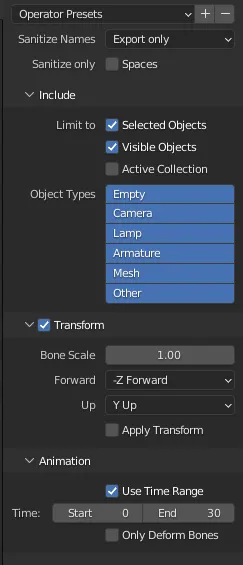
File>Export>Maya Animation (.anim). - You can use these settings for the export:
Importing Animations to Track Studio
Section titled “Importing Animations to Track Studio”To import the exported .anim file into Track Studio, follow these steps:
-
In Track Studio, right-click on the
Animationsfolder and click onNew Skeletal Animation. -
This will create an empty animation, right-click on it and use
Replaceto import your.animfile. -
Preview the animation in the
Animation Graphtab, if everything looks good, you can save your model.
More resources
Section titled “More resources”You can consult the official documentation for more information about this topic:
Shutout to @Spooner for discovering that it is possible to use Track Studio for ACNH!